How to Download Apple Music to MP3 Easily and Safely to Chromebooks in 2026
With millions of songs available on Apple Music, it’s one of the most popular streaming platforms in the world. However, many users still face the same frustration: Apple Music songs can’t be played freely outside the app. Once your subscription ends, your downloads disappear—and you can’t transfer them to MP3 players, USB drives, or other devices.
So, is it possible to download Apple Music to MP3?
The short answer is yes, with the right tool. In this guide, we’ll show you how to convert Apple Music to MP3 safely and efficiently using ViWizard Apple Music Converter.
Table of Content
Why Can’t You Download Apple Music to MP3 Directly?
Apple Music uses DRM (Digital Rights Management) protection to restrict how songs are used. Even if you download tracks for offline listening, they are saved in a protected format that:
- Only works inside the Apple Music app
- Can’t be copied to USB drives or external hard disks
- Can’t be played on non-Apple devices
- Becomes unavailable after your subscription expires
That’s why simply using iTunes or the Apple Music app won’t let you export songs as MP3 files. To truly own your music files, you need a professional Apple Music to MP3 converter, for example, ViWizard Apple Music Converter.
The Problem with “Free” Converters
A quick Google search might tempt you with free online converters or browser extensions. While they sound appealing, they come with significant risks:
- Security Risks: Many free online tools are riddled with malware, spyware, or excessive ads that can compromise your data .
- Quality Loss: Free tools often cap quality at 128kbps or introduce background noise .
- Bulk Conversion Limits: You usually have to download songs one by one, which is tedious for entire playlists.
- Unreliability: These sites frequently go down or change their terms, making your music library unstable.
For a safe, high-quality, and efficient solution, professional software like ViWizard Apple Music Converter is the only reliable path forward.
Introducing ViWizard Apple Music Converter
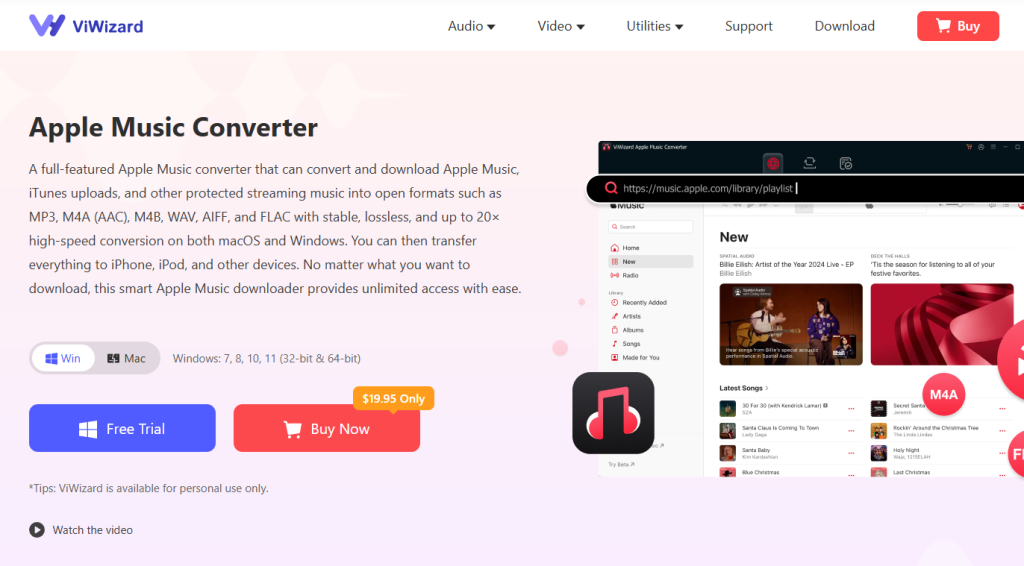
ViWizard Apple Music Converter is a professional desktop application designed specifically to download and convert Apple Music tracks to universally compatible formats . It acts as a bridge between Apple’s walled garden and your personal music library.
Key Features of ViWizard
- Remove DRM Protection: ViWizard strips the DRM encryption from Apple Music, iTunes M4P files, and audiobooks, making them playable anywhere.
- Convert to MP3 & More: It supports a wide range of output formats including MP3, AAC, WAV, FLAC, and M4A.
- Lossless Quality: The software preserves 100% of the original audio quality, supporting bit rates up to 320 kbps for crystal-clear sound.
- Lightning Fast Speed: With advanced conversion technology, ViWizard can process music at up to 30X faster speeds and handles batch conversions effortlessly.
- Preserve ID3 Tags: After conversion, all metadata—including song title, artist, album, genre, and album artwork—remains intact, keeping your library perfectly organized.
Step-by-Step Guide: How to Download Apple Music to MP3
Ready to take control of your music? Follow this simple guide to convert your Apple Music library to MP3 using ViWizard.
Step 1: Install ViWizard Apple Music Converter
Visit the official ViWizard website and download the version compatible with your system (Windows 11/10 or macOS). Run the installer and launch the application.
Step 2: Log In to Your Apple Music Account
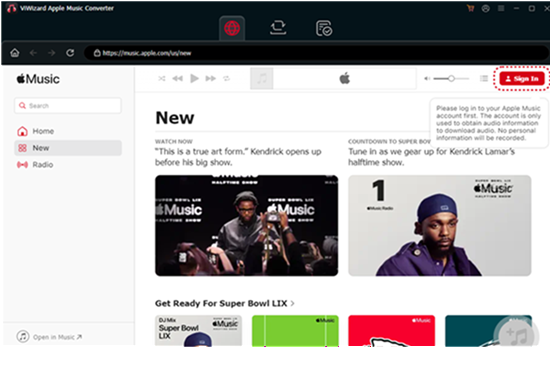
Upon launching ViWizard, an integrated web player will open automatically. Click the “Sign In” button in the top-right corner and enter your Apple ID credentials. This gives ViWizard access to your library.
Step 3: Set MP3 as Your Output Format
Before adding files, customize your output settings.
- Click the menu icon (usually three lines) in the top-right corner and select “Preferences”.
- In the settings window, set the Output Format to MP3.
- Adjust the audio parameters as desired. For the best experience, set the Bit Rate to 320 kbps. You can also change the Sample Rate and output folder here.
Step 4: Select Your Music
Browse the Apple Music web player within ViWizard. Find the songs, albums, or playlists you want to convert.
- Open the playlist or album.
- Click the “Add” button (usually a “+” icon) in the bottom-right corner to load all tracks into the conversion list.
Step 5: Start the Conversion
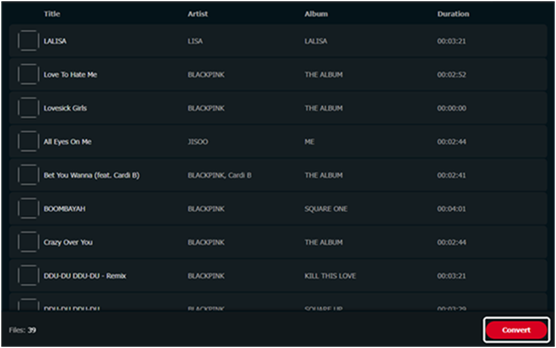
Once your tracks are loaded, simply click the big “Convert” button. ViWizard will begin processing the files. Thanks to batch conversion, you can convert an entire playlist in a fraction of the time it would take to play it.
Step 6: Enjoy Your DRM-Free MP3s
After the conversion is complete, click the “Converted” tab to find your files. You can now transfer these MP3s to any device you own—from your iPod Classic to your Android phone—without any restrictions or save them to your Chromebooks.
Frequently Asked Questions
Q: Is it legal to convert Apple Music to MP3?
A: Yes, converting music for personal use is generally accepted as “fair use.” ViWizard is designed to help you back up and manage music you have legally subscribed to or purchased. You should not distribute or resell the converted files .
Q: Can I keep the files if I cancel my Apple Music subscription?
A: Absolutely. Once you convert the tracks to MP3, they are permanent files stored on your computer. You can keep them forever, even after your subscription lapses .
Q: Do I need an active subscription to use ViWizard?
A: Yes. To initially access and download the tracks from Apple Music, you must have an active subscription and log in with your Apple ID .
Q: Will the conversion take a long time?
A: No. ViWizard utilizes high-speed conversion technology. Depending on your computer’s specs and the number of files, you can convert an entire album in just a few minutes, far faster than real-time recording methods .
Final Verdict: Take Ownership of Your Music
Apple Music provides the keys to a massive kingdom of music, but they don’t let you keep the keys forever. ViWizard Apple Music Converter is the ultimate tool for anyone who wants true ownership of their digital library.
Whether you are looking to play your music on non-Apple devices, preserve your collection after a subscription ends, or simply organize your files without DRM restrictions, ViWizard offers the fastest, safest, and highest-quality solution on the market.
Don’t let your music be held hostage by DRM. Download ViWizard today and start building an MP3 library that you actually own.